
DFM Realtime Studio
One policy, about five minutes. Every Chrome profile signed in with a company account gets the extension force-installed, pinned and auto-updated from our own feed. No Web Store, no device enrolment.
What you will paste
iokdekijoeafjfgmecfaohgembnjbcgahttps://studio-realtime-updates.pages.dev/update.xml{
"trackedDatabaseId": "3d315859033b80839729cd1fd0cb2b64",
"changesDatabaseId": "3d215859033b80c3bc42ffcd0f98ee56",
"clickupListId": "901819561698"
}Steps in the Google Admin console
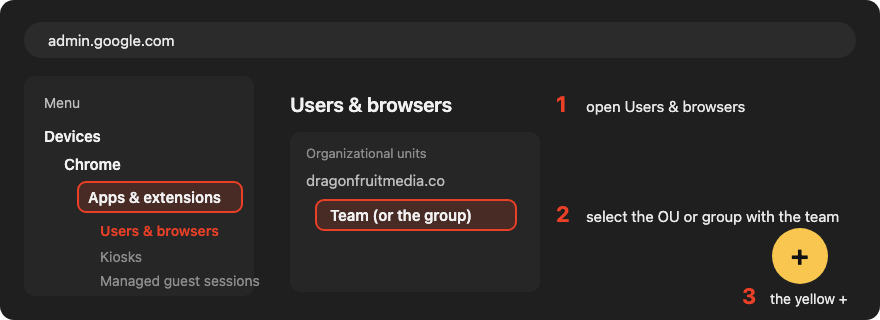
Devices → Chrome → Apps & extensions → Users & browsers
Select the organizational unit (or group) that contains the Dragonfruit team, then the yellow + at the bottom right → Add Chrome app or extension by ID.
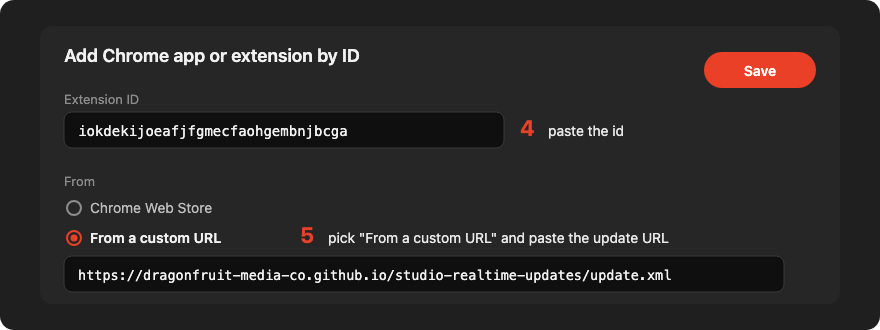
Add by ID, from our custom URL
Paste the extension id, choose From a custom URL and paste the update URL, then Save.
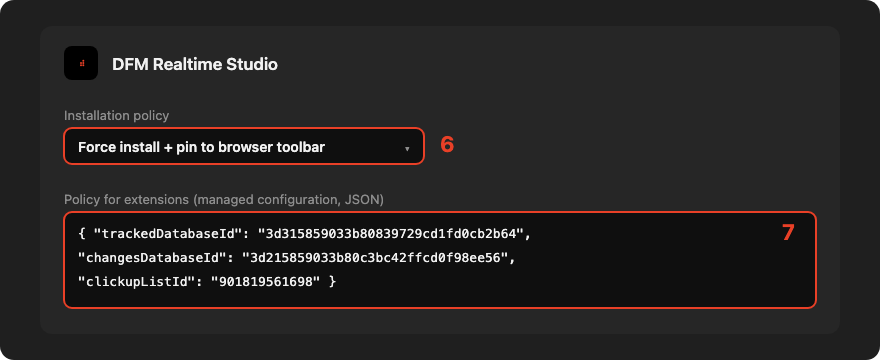
Force install, pin, and the managed configuration
Set the installation policy to Force install + pin to browser toolbar. In the extension's settings, paste the JSON above under Policy for extensions. It pre-fills the two Notion database ids and the ClickUp list id — teammates sign in with their own Google account and need nothing else.
Done
Chrome applies user policy within minutes to any profile signed in with a managed account. Updates are pulled from the feed every few hours; chrome://extensions → Update forces one.
If policies are managed by file or GPO instead
{ "iokdekijoeafjfgmecfaohgembnjbcga": {
    "installation_mode": "force_installed",
    "toolbar_pin": "force_pinned",
"update_url": "https://studio-realtime-updates.pages.dev/update.xml" } }The feed (this site) hosts only the signed package and its update manifest. Teammates authenticate with their own @dragonfruitmedia.co Google sign-in — no tokens or secrets are distributed through policy, just the three ids above. Source and details: docs/deploy-managed.md in the private repo.